Sigil
Project Setup
Configure key, scale, tempo, chords, groove, soundfonts, and editing rules.
Project Setup
The Project tab sets the musical rules the rest of the song works inside. It controls key, scale, tempo, structure, note defaults, groove, chord assignments, and the editing aids that keep the piano roll aligned with the project.
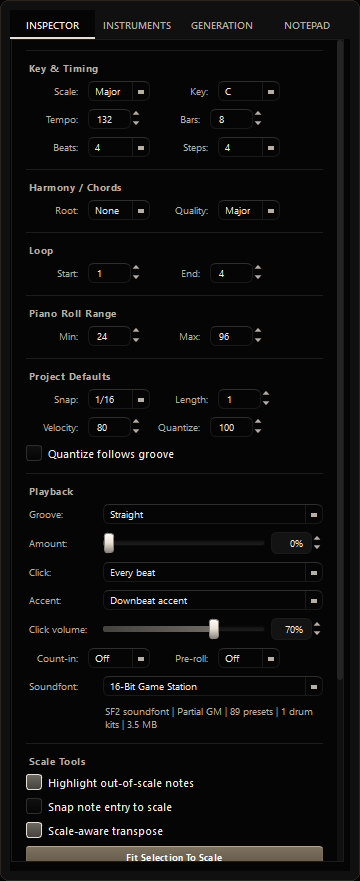 Project tab: key, harmony, tempo, and structure
Key and scale
Scale selects the active musical scale, such as Major, Minor, Dorian, or Pentatonic.
Key sets the tonal center that the scale is built from.
Together they define which notes are treated as in-scale. Changing them does not move existing notes automatically; it changes the visual guidance and the behavior of scale-aware tools.
Harmony and chords
The Harmony / Chords section assigns a chord to the selected bar in the Song Overview.
- Root sets the chord root, such as C, G, or F#.
- Quality sets the chord type, such as Major, Minor, Diminished, Augmented, Sus2, Sus4, 7, Major 7, Minor 7, or Minor major 7.
- Set Root to None when no chord should be assigned.
Chord assignments are used by harmony-aware pattern tools:
- Fit Pattern To Chord moves clashing notes toward chord tones.
- Add Chord Tones adds harmony notes around existing material.
- Bass Follow Chord Root aligns bass notes with the assigned chord root.
If no chord is assigned, harmony tools fall back to the project key and scale instead.
Tempo and time signature
| Setting | Purpose |
|---|---|
| Tempo | Song speed in beats per minute. |
| Beats/Bar | How many beats fit in one bar. 4 is standard 4/4 time. |
| Steps/Beat | Grid resolution. 4 gives sixteenth-note resolution; 8 gives finer thirty-second-note detail. |
Length and looping
- Bars sets the total song length.
- Loop start sets the first bar of the playback loop.
- Loop end sets the final bar of the playback loop.
The loop range here is linked to the transport bar, so changing it in either place updates the same playback window.
Piano roll range
Pitch min and Pitch max control the visible piano roll pitch range.
MIDI pitches run from 0 to 127. Middle C is 60. A practical working range is often 36 to 84.
Note defaults
- Default draw length sets the length of new notes.
- Default note velocity sets how loud new notes start.
- Snap grid controls quantize resolution.
- Quantize strength controls how strongly notes move toward the grid.
- Quantize follows groove uses the project groove timing instead of a straight grid.
These settings affect future edits and tools. Existing notes keep their current values until you change them directly.
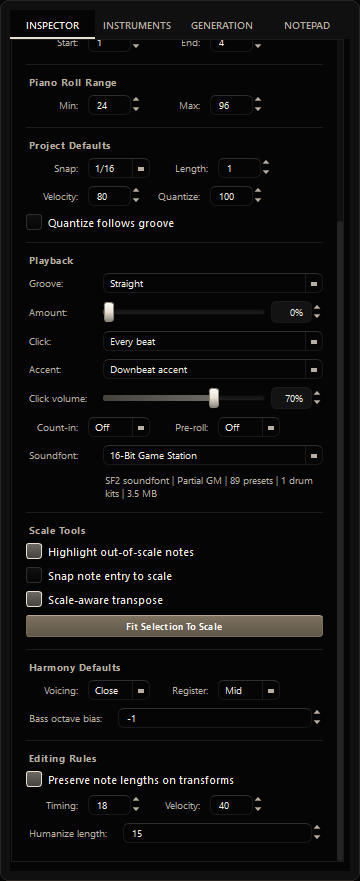 Project tab: note defaults, groove, scale, and editing rules
Soundfont
The song-level soundfont sets the default playback and audio export source for the whole project. Individual tracks can still override it in the Instruments tab.
Use track-level overrides when one instrument needs a specialist sound library while the rest of the project uses the default soundfont.
Playback and groove
Groove sets the rhythmic feel:
- Straight keeps notes exactly on the grid.
- Swing 8ths delays every second eighth-note subdivision.
- Swing 16ths applies swing at the sixteenth-note level.
Amount controls swing intensity. A value around 30-55% is often enough to add feel without making the timing collapse.
Metronome controls include subdivision, accent behavior, click volume, count-in, and pre-roll.
Scale tools
- Highlight out-of-scale notes visually marks notes outside the active key and scale.
- Snap note entry to scale forces newly drawn notes onto the nearest in-scale pitch.
- Scale-aware transpose moves notes by scale steps instead of semitones.
- Fit Selection To Scale moves selected notes to nearest in-scale pitches.
Harmony defaults
- Voicing controls how harmony tools spread chord notes.
- Register sets preferred pitch height for harmony helper tools.
- Bass octave bias pushes support notes lower or higher for bass-aware tools.
These settings affect harmony-aware tools, not manual note drawing.
Editing rules
- Preserve note lengths on transforms keeps durations intact during musical transforms.
- Humanize timing controls timing variation.
- Humanize velocity controls loudness variation.
- Humanize length controls note-duration variation.