Grimoire Standalone
AI setup and model management
Local AI workflows use Grimoire’s custom ComfyUI installation and compatible model packs. Install this runtime through the AI Install Wizard. Hosted APIs use an online provider instead. Some cleanup tools run entirely inside Grimoire; others need an optional processing sidecar.
Local AI workflows use Grimoire’s custom ComfyUI installation and compatible model packs. Install this runtime through the AI Install Wizard. Hosted APIs use an online provider instead. Some cleanup tools run entirely inside Grimoire; others need an optional processing sidecar.
Find these settings
Click AI in the top menu. Choose Install Wizard for installation, Model Management for model packs, or ComfyUI Runtime for starting and managing the installed runtime.
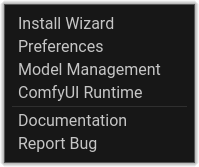 The AI menu contains installation, model, and runtime settings.
Custom ComfyUI installation
- Open the AI settings Install Wizard. Choose a writable installation location.
- Read the displayed disk and platform requirements, then install and verify the runtime. Runtime space and model space are separate; large model packs need additional room.
- Open model management and download the pack for the workflow you want.
- Start Grimoire’s custom ComfyUI runtime and refresh models. Confirm that compatible models appear before generating.
Model families
A checkpoint can package components together. Separate diffusion-model loading also needs compatible text encoder(s) and VAE. LoRAs must match the base model family; ControlNet requires matching supporting models/nodes. Qwen Image 2.1 and MiniMax H3 have dedicated packs. Use the app’s current pack status and compatibility errors rather than selecting unrelated files to fill empty fields.
Platform and processing backends
The runtime and available acceleration differ by platform. Qwen uses platform-specific model variants; animation exposes native/MLX paths where supported. Follow the installed pack and backend status shown by this build. Neural Pixelate, Pixel-Art Fixer, Advanced Palette Reduction, and K-Centroid Resize use processing sidecars; standard pixelation, simple palette processing, and ordinary brushes do not require a diffusion server.
When setup fails
Check free space, write permissions, download status, runtime logs, and the installation status in the Install Wizard. Verify the custom runtime and refresh models after installing the required packs. A running server can still lack a required capability. Use the runtime controls to restart after correcting a dependency; avoid installing every pack just to resolve one missing-model error.