Grimoire Standalone
Tileset Editor
Assemble Wang or Blob tile sheets from prepared artwork. Tileset Editor runs locally and uses the active frame as a grid of 32×32 source blocks.
Assemble Wang or Blob tile sheets from prepared artwork. Tileset Editor runs locally and uses the active frame as a grid of 32×32 source blocks.
Find and open this tool
Click Tileset Editor in the left AI rail or the AI tab on the right.

Prepare the source
Create a frame whose width and height are multiples of 32 pixels. Arrange terrain artwork in 32×32 blocks: a filled center, useful edges, and corners. Each block appears in Source blocks. An arbitrary character sprite is not prepared terrain artwork.
Build a sheet
- Choose Topology: Wang — 5 × 3 or Blob — 11 × 5.
- Select a source block, then click a cell in Role guide to assign it. Assign the anchor (filled center), edges, and corners from your prepared blocks.
- Switch Guide corners between Outer and Inner to assign both corner types.
- Use Selected role to adjust its source block, Rotation, Flip X, or Flip Y. Assign Selected applies the selected source block to that role.
- Set Outer margin for the transparent cutback of automatically derived edges. Review the generated sheet before Send.
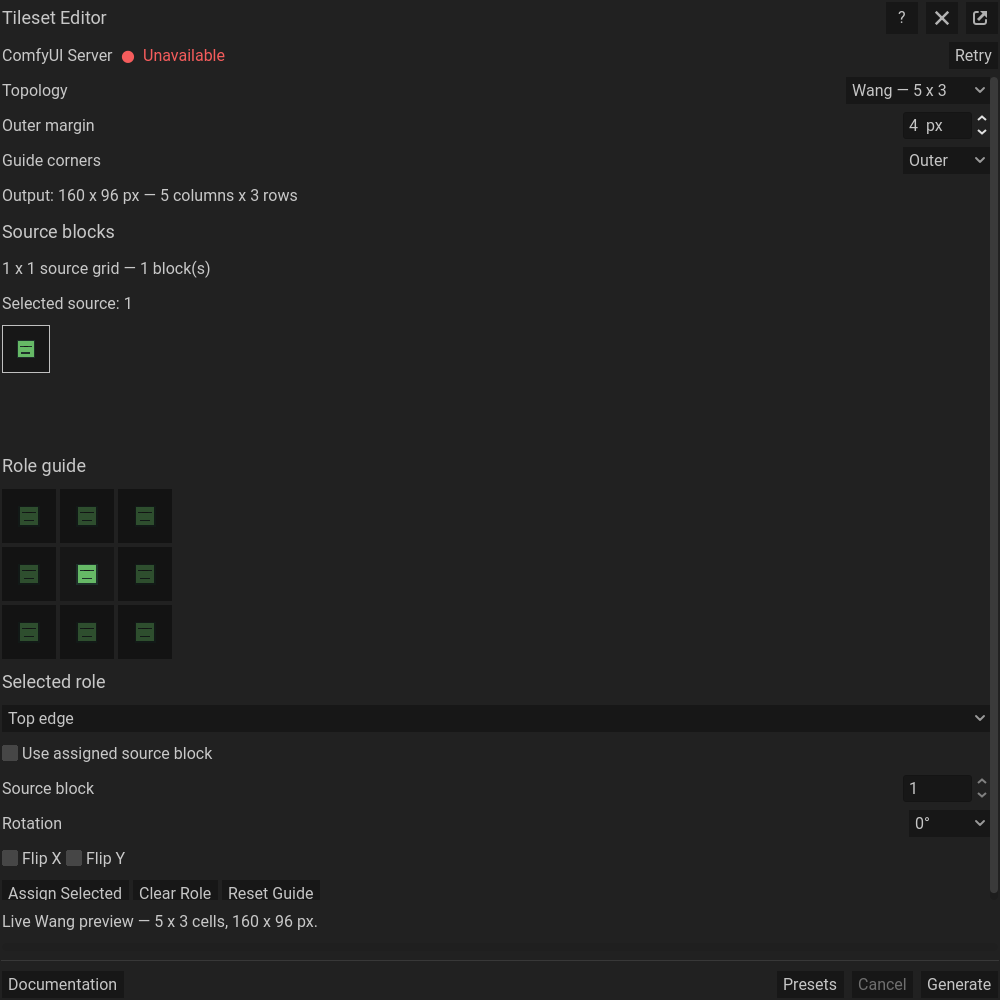 Tileset Editor: topology, source blocks, and tile-role assignments. This capture demonstrates controls using the tutorial sprite; use prepared tile artwork for a usable tileset.
Role controls
Right-click a guide cell or use Clear Role to remove an explicit assignment. The anchor remains assigned; unassigned roles fall back to the anchor artwork. For corner roles, Composite adjacent edges instead builds the corner from neighboring edges rather than using the assigned corner artwork. Reset Guide restores the initial assignments.
Review and import
Wang produces a 160×96 sheet. Blob produces a 352×160 sheet containing 47 Blob masks. Check edge continuity, inner and outer corners, and transparency. Send the sheet as a New Sprite to inspect it at its full dimensions, then save or export it for your tile workflow.
Common problems
Invalid source dimensions: use multiples of 32 pixels. Repeated or unsuitable blocks: check the source frame and role assignments. Incorrect corners: check Outer/Inner, transforms, and compositing. Broken seams: revise the source blocks or margin and regenerate. To paint terrain properties on an existing tilemap, see Tiles Property Painter .